From recurring work to a trusted agent in production.

Watch a plain-language description become an Organizational Agent — built from the work your team already repeats, or brought in from what you use today.

Simulate in minutes. Published within an hour.

Talk to us
Where your agent starts

Start with the work. Not a support ticket.

Your team already knows what repeats every week. You craft that into an agent — and make it available to the team — without an engineering backlog or a software vendor’s roadmap.

Start there — not with which Agent to build.
Recurring work
Skill
Agent Plugin
Existing Agent
→
JoyStream
Engineering
Summarize every day's shipped work
Published
Marketing
Repurpose one post into a week of channels
Pilot
Revenue Ops
Qualify every inbound lead
Plan
Customer Success
Prep every renewal review
Simulate
Finance
Close the books on time
Plan
People
Onboard every new hire
Pilot
Make | Operate

Build the agent. Then run it as part of the team.

JoyStream keeps creation and operation in one shared lifecycle, so your team builds and operates agents together in shared Human + Agent Workspaces — you make an agent, then operate it with ownership, trust, visibility, and control.
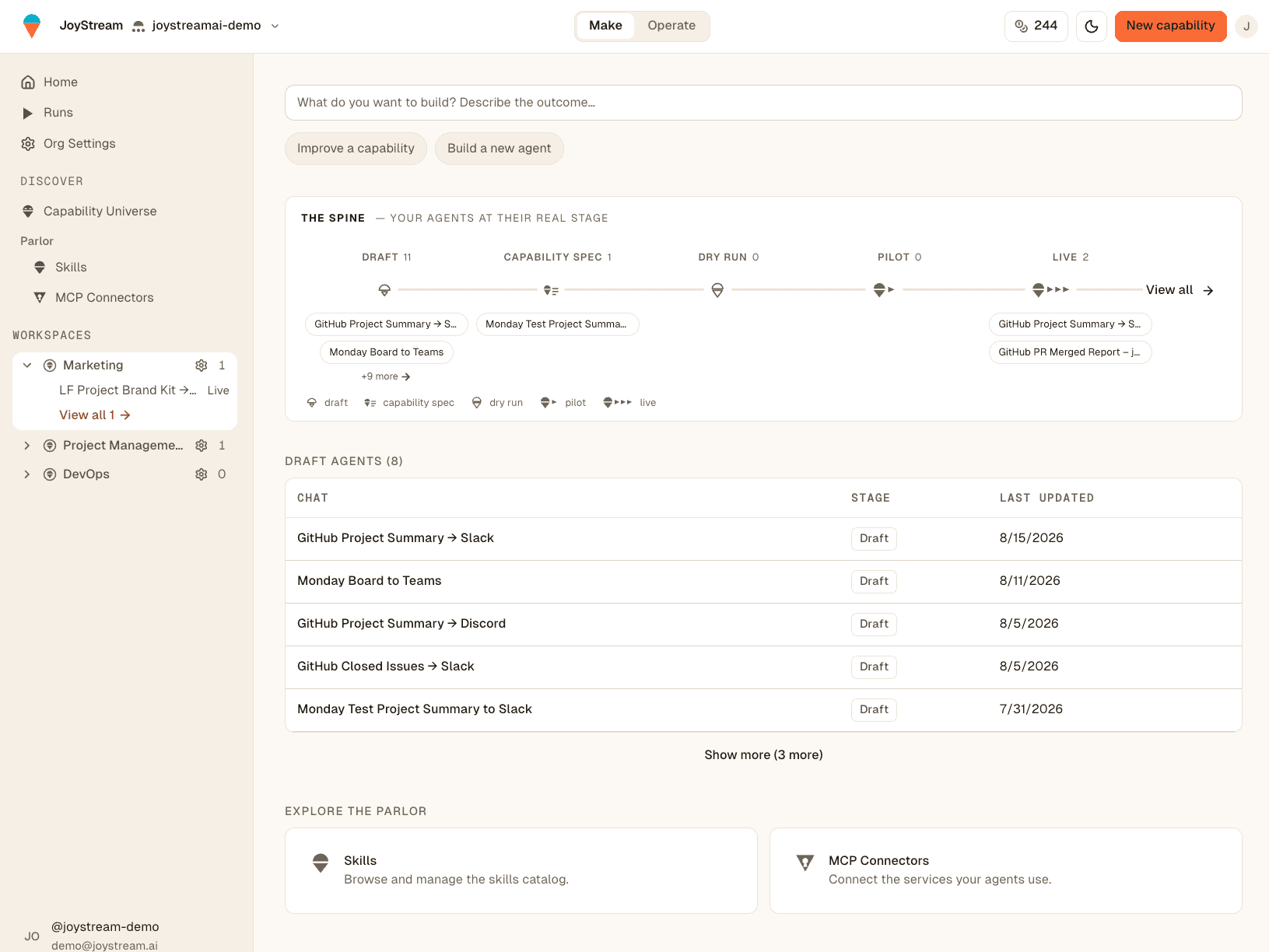
JoyStream in Make mode — the build prompt, the Spine (Draft → Capability Spec → Dry Run → Pilot → Live), the Draft Agents table, and the Parlor (Skills, MCP Connectors).
Inbound Lead Follow-upRun #1284
CompletedPilotv0.3.0
  • Read new leads (CRM)
  • Draft a tailored follow-up
  • Queue each draft for review
started 9:00 AM · 38s · 3 drafts queued · 0 errors
Every run becomes a semantic ticket your team can inspect, review, and act on.
From first draft to trusted production operation — one system, one lifecycle.
Progressive Agent Authority

Trust is earned — before an agent touches a live system.

No agent jumps to production on confidence alone — it earns authority by demonstrating what it does, safely and with evidence.

Simulate
Pilot
Published
Simulate
See what the agent will do — without touching a live system, a customer, or your data.
systems: simulated · live calls: 0
Pilot
Let it operate with bounded authority, and observe the results.
systems: real · scope: bounded
Published
Expand responsibility once the evidence supports it.
authority: approved on evidence

Simulate shows intended behavior. Runs show actual behavior.

Review Request

Every promotion opens a Review Request — a pull request for your agent, approved by a named person before it goes live.

Review RequestAwaiting review#42
Promote “Inbound Lead Follow-up” to Pilot
Requested by Marcus→review by Riya
Evidence attached
  • Simulate — 24 runs · 0 live calls
  • Dry run — output matched on 24 / 24
  • Scope — reads the CRM, drafts only (no send)
Approve & promoteRequest changes
More evidence. More trust. More authority.
Agent Universe

Don’t start from scratch. Start from what already works.

Adopt something your team — or your organization — has already built, proven, and operated, then adapt it to your workflow and move it through the same trusted lifecycle.

Agents11 total
Org Visible
GitHub Closed Issues → Slack
Fetches the 10 most recently closed issues from the project board and posts a digest to the channel.
joystreamai-demoPublished
Org Visible
GitHub Project Summary → Slack
Summarizes open, closed, and in-progress tickets from the GitHub Project and posts the rollup.
PersonalPilot
Private
Weekly Competitor Watch → Slack
Scans tracked competitors each week and drafts a what-changed summary for the team to review.
MarketingSimulate
Your team’s agents today. A universe of reusable agents tomorrow.
Control Plane

Connect agents to your stack. Keep the team in control.

Your agents need access to where the work happens — GitHub, Slack, Google, your CRM, your data warehouse. JoyStream gives your team a shared control plane for connections, credentials, authority, and tool activity.

Credentials Vault
Keep access owned by the team, never trapped on one person's laptop or an individual agent setup.
Connections
Connect agents to approved tools and services through one centrally managed control plane.
Access Control
Credentials are scoped to the agents in a workspace, so access stays with the team that owns the work.
Organization Vaultowned by the org
GitHubOrg-wide
SlackOrg-wide
GGoogleMarketing workspace
CRCRMRevenue workspace
Agents get permission to act. The organization keeps the credentials, the scope, and the record.
One control plane for how your agents connect to and act on your systems.
See it run, end to end
A real run — from the work to the result.
Everything above, in one Run: an agent watches what engineering shipped, summarizes it the moment it happens, and posts it to the channel where the team reads it — no handoffs, no copy-paste.
GITHUB CHANGES → JOYSTREAM RUN → SLACK SUMMARY
joystream/platformmain
10 pull requests merged today
  • #567 Agent Runs populate on the agent page
  • #617 Fix the trial-credit funding path
  • #604 Move credit pricing to a versioned table
checks passed+2,304−890
merged into main · 4 contributors
Engineering ships in GitHub
→
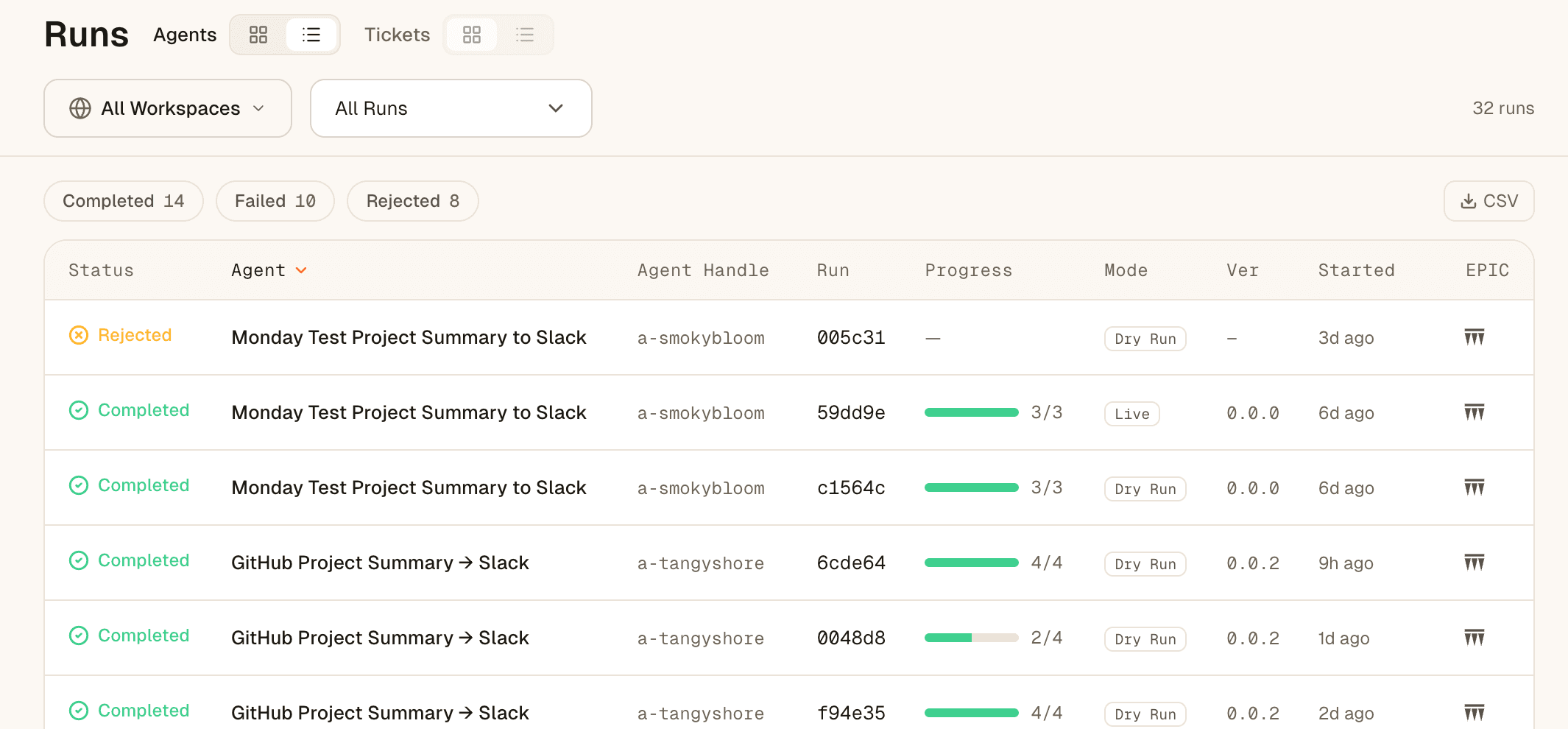
JoyStream Runs table — every Daily GitHub Summary run with status, progress, and mode
The Run executes
→
# marketing
JoyStream App1:58 PM
Shipped today — worth an announce?
  • Agent Runs now show on the agent page
  • Trial-credit funding path fixed
  • Credit pricing moved to a versioned table
✅3🎉2
🧵 2 replies · last reply 4m ago
Your team reads it in Slack

Craft your first agent this afternoon.

Talk to us