Make Agents Organizational

Agents your organization can authorize and reuse.

Create from recurring work, or bring the Skills and Agent Plugins you already use. Dry run in minutes. Live within an hour. With evidence and approval before production.

Make and operate agents together across Marketing, Sales, HR, Finance, and IT.

Employee OnboardIT·Live
Lead QualificationSales·Pilot
Interview SchedulingHR·Dry Run
GitHub Release SummaryMarketing·Live
Daily GitHub Change Summary
Review every GitHub change and deliver a daily summary to the team.
GITHUB CHANGES JOYSTREAM RUN SLACK SUMMARY
joystream/platformmain
10 pull requests merged today
  • #567 Agent Runs populate on the agent page
  • #617 Fix the trial-credit funding path
  • #604 Move credit pricing to a versioned table
checks passed+2,304−890
merged into main · 4 contributors
Changes land in GitHub
JoyStream Runs table — every Daily GitHub Summary run with status, progress, and mode
The Run executes
# eng-daily
JoyStream App1:58 PM
10 issues closed today
  • Agent Runs now show on the agent page
  • Trial-credit funding path fixed
  • Credit pricing moved to a versioned table
3🎉2
🧵 2 replies · last reply 4m ago
The team reads it in Slack
The Shift · Everyone builds. Organizations operate.

Anyone can build an agent now.

People across Marketing, Sales, HR, Finance, and IT are building agents for their team’s work. But the agents a team depends on shouldn’t be trapped with one person—stuck on a laptop, known only to whoever built them.

The agents a team runs on should be organizational: owned, trusted, operated, and reused by the team—not a personal artifact.

Personal Agent
Created and used by one person
Organizational Agent
Owned, trusted, operated, and reused by the team
That is the shift from Personal Agents to Organizational Agents.
JoyStream is the operating system for Organizational Agents.
Where your agent starts

Start with the work.

Your team already knows what needs to happen repeatedly: qualify every inbound lead, prepare every renewal review, summarize yesterday’s GitHub changes, onboard every employee.

Start there—not with which Agent to build.
Recurring work
Skill
Agent Plugin
Existing Agent
JoyStream
Engineering
Daily GitHub Summary
Live
Marketing Operations
Launch LinkedIn Campaigns Consistently
Pilot
Revenue Operations
Qualify every inbound lead
Plan
Customer Success
Prepare every renewal review
Dry Run
People
Onboard every employee
PILOT
Finance
Close the books on time
Plan
IT
Provision every new laptop
Pilot
Make | Operate

Build the agent. Then run it as part of the organization.

JoyStream keeps creation and operation in one shared lifecycle, so teams build and operate agents together in shared Human + Agent Workspaces. Make them from recurring work or bring what you already have; then operate them with ownership, trust, visibility, and control.

JoyStream in Make mode — the build prompt, the Spine (Draft → Capability Spec → Dry Run → Pilot → Live), the Draft Agents table, and the Parlor (Skills, MCP Connectors).
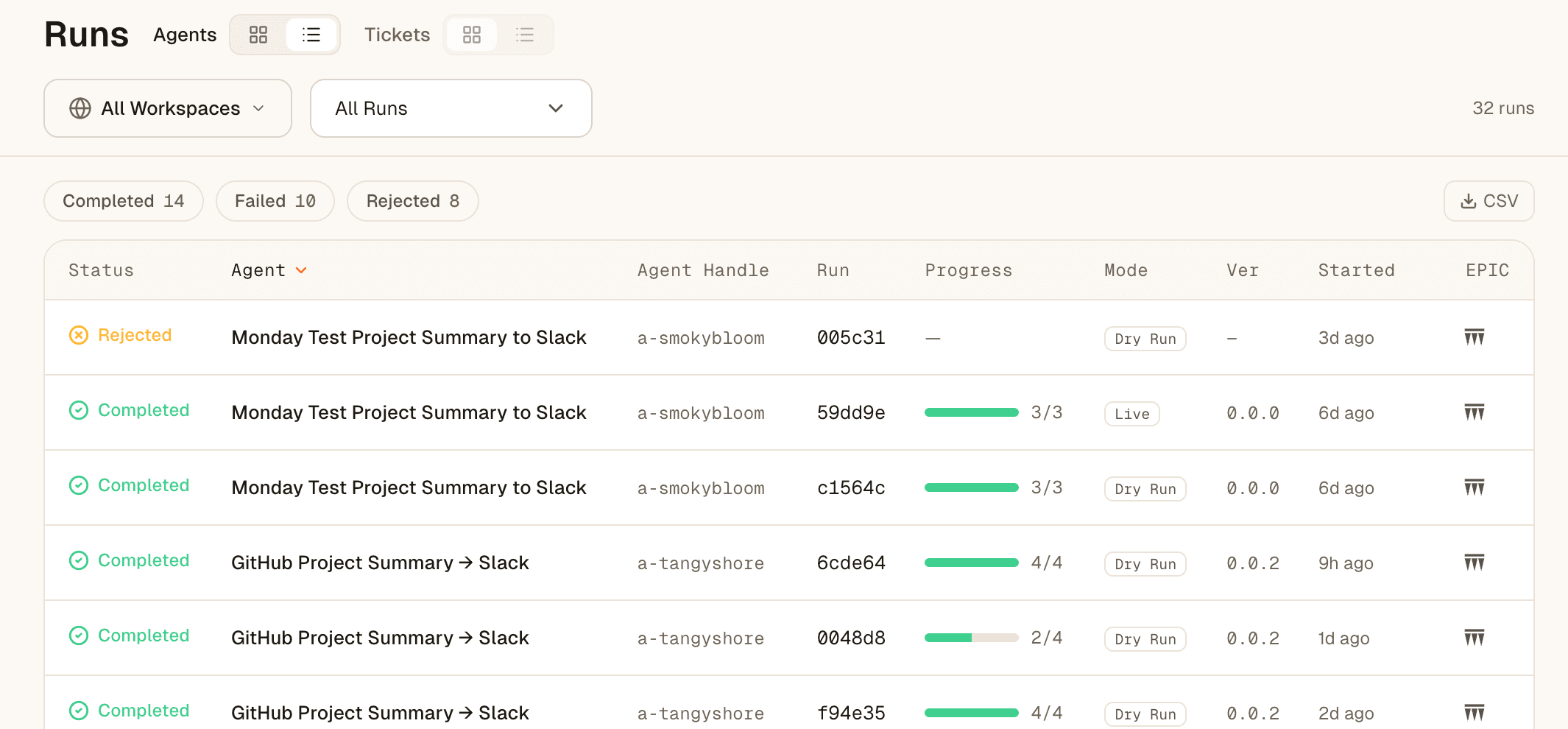
The Runs view — every agent execution as an inspectable record: status (Completed / Failed / Rejected), agent, run id, progress, mode (Dry Run / Live), version, and when it started.
Every run becomes a semantic ticket your team can inspect, review, and act on.
From first draft to trusted production operation—one system, one lifecycle.
Progressive Agent Authority

Trust is earned through evidence.

An agent shouldn’t jump from prototype to production on confidence alone. JoyStream moves agents through increasing levels of authority as they demonstrate what they can do—safely and reliably.

Dry Run
Pilot
Live
Dry Run
See what the agent will do—without affecting production.
systems: simulated · live calls: 0
Pilot
Let it operate with bounded authority, and observe the results.
systems: real · scope: bounded
Live
Expand responsibility once the evidence supports it.
authority: approved on evidence

Dry Run shows intended behavior. Runs show actual behavior.

The Evidence screen: readiness (Build complete, two connections missing, Conform coming soon), the Dry Run / Pilot / Live evidence rows with run counts and pass results, and the promote decision — Run a dry run, Promote to Pilot, Promote to Live.

Throughout the lifecycle, your team controls credentials and access, reviews what the agent actually did through semantic Runs and tickets, and can intervene when needed.

More evidence. More trust. More authority.
Agent/Capability Universe

Don’t start from scratch. Start from what already works.

JoyStream lets you begin with an existing Agent, Skill, or Agent Plugin—then adapt it to your organization and move it through the same trusted lifecycle.

The Capabilities catalog — every Organizational Agent your org has built, with its connectors, visibility, and lifecycle stage, filterable and ready to reuse.
Agents
Reuse Organizational Agents your team has already built, proven, and operated.
Skills
Bring existing Skills and make them part of your Organizational Agents.
Agent Plugins
JoyStream supports the Agent Plugins standard—bring yours and run them on JoyStream.
Your organization’s agents today. A universe of reusable agents tomorrow.

Today, it helps teams reuse what already exists inside their organization. Over time, it becomes a broader universe of open and shared agents, Skills, and Plugins—everything you bring in connected, dry-run, authorized, operated, and reused through JoyStream.

Control Plane

Connect agents to the tools they need. Keep the organization in control.

Organizational Agents need access to the systems where work happens. JoyStream gives teams a shared control plane for connections, credentials, authority, and tool activity.

Credentials Vault
Keep access owned by the organization, never trapped in a developer laptop or an individual agent setup.
Connections
Connect agents to approved tools and services through one centrally managed control plane.
Access Control
Credentials are scoped to the agents in a workspace, so access stays with the team that owns the work.
MCP Connectors — connect once; every skill and agent runs on your credentials
The MCP Connectors surface — the connectors your organization has connected (GitHub, Slack, Google, Attio, Teams…), each connected at a scope, plus a searchable catalog of every available connector.
Organization Vault — credentials owned by the org, scoped per workspace
The Organization Vault — connected providers grouped by who can use them, each with a Scope control (org-wide or selected workspaces) and Disconnect.
One control plane for how Organizational Agents connect to and act on your systems.
From zero to first agent in an hour

Make an Organizational Agent. Or bring one with you.

Start from recurring work, an existing Agent, Skill, or Agent Plugin. JoyStream gives your team one place to build, trust, operate, and reuse it in production.